
If you’re looking to generate more leads or sell more products online, you may have come across Leadpages. If you’re wondering what this tool has to offer, and whether it can help you to achieve those goals, then read on for our review.
Designed for creating landing pages, pop-ups, alert bars and even complete websites, Leadpages should appeal to both WordPress and non-WordPress users who’d like to grow their business or increase their audience.
With an impressive library of high-quality templates, a modern content editor and some handy optimization tools, Leadpages has everything you need to start collecting email addresses from your visitors, generating registrations, and selling products and services online.
However, despite its powerful set of features, Leadpages isn’t right for everyone, nor is it the only landing page builder and lead generation tool out there, but by the time you’ve finished reading this review you’ll know if it’s the right option for you.
Let’s get started…
What is a landing page? A landing page is a webpage with a singular focus. The goal is usually to capture a visitor’s email address in exchange for an item like a webinar or e-book. Since you are probably familiar with the Internet, let’s move on.


While this review will explore the features in-depth, as well as explain its pros and cons, here’s a quick overview of what you get:
- An impressive library of customizable templates — Leadpages has a huge library of editable templates for creating landing pages and other types of content.
- Conversion tools — in addition to creating pages, you can also create pop-ups and alert boxes, and then add them to your website — including WordPress websites — to generate more leads.
- Modern page editor — Whether you want to start from scratch and create your own unique landing page or customize one of the templates, the drag-and-drop builder makes the process as straightforward as it could be.
- Split testing — All of the Leadpages have been built for high conversions, but you can also run your own tests to see which of your designs get the best response from your audience to remove all of the guesswork from creating effective landing pages.
- Integration options — Leadpages integrates with a wide range of third-party services, including payment processors, email marketing tools and social media advertising platforms, to name just a few.
Whether your goal is to grow your email list, generate registrations for an event, sell products or encourage your audience to perform some other action, Leadpages and its templates, content editor and conversion tools — not to mention its long list of integration options — should be able to help.
But, as this review will demonstrate, it isn’t without its drawbacks, and, because of this, it may not be the best landing page builder for everyone.
Leadpages Features
The full list of features definitely looks impressive, but do they stand up to scrutiny? And does this landing page service deliver on its promises? Let’s take a look at the main features to find out.
LEADPAGES TEMPLATES
To help you to start creating effective landing pages as quickly as possible, Leadpages provides you with more than 150 templates to choose from.


Leadpages has a large library of conversion-focused templates, covering landing pages, websites and other types of content.
Not only do the templates look highly professional, but they’ve also been optimized for the best results. In fact, the Leadpages team optimize their templates based on the data they’re able to collect by hosting thousands of pages for their users. You can even sort the templates by conversion rate to quickly find the most effective designs.

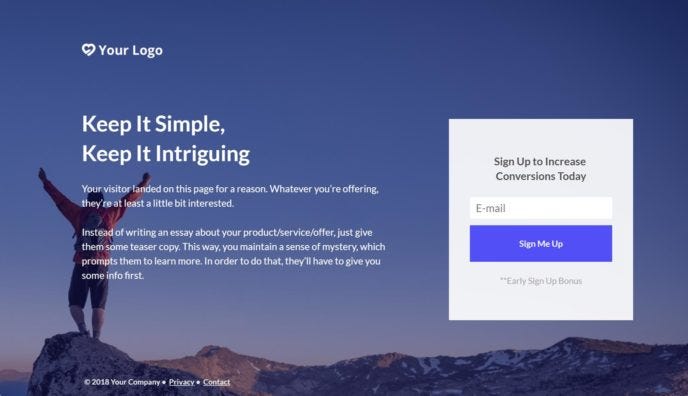
Among the landing page templates are options for generating webinar or virtual event sign-ups, promoting offers, selling products, plus a lot more.
If you’re a service provider, such as a freelancer or consultant, there are some templates that should be able to help you to generate more business, too.


Leadpages can help you to build a website or publish a landing page to promote your services.
As all of the templates can be edited in the Leadpages drag-and-drop content builder, you’re not limited to using them as they are.
OTHER FEATURES OF LEADPAGES
Although the core features of Leadpages are its builder that lets you create custom landing pages, websites and conversion tools for your website, there are a few other features that are worth mentioning:
- The Checkouts feature lets you collect payments for products and services via Stripe.
- There are automatic SSL encryptions for your pages and sites.
- There’s a one-on-one quick start call for new customers.
- Telephone, email and live chat support channels are available (depending on your chosen plan).
- There’s a file delivery system for sending lead magnets to subscribers.
You can see everything Leadpages can do on the feature index page of its website.
LEADPAGES PRICING
Thanks to the free trial period, you can try Leadpages for 14 days before making your first payment.
However, when you sign up, you’ll need to choose from the available pricing plans:
- Standard: Supports one site and costs $25 a month billed annually, or $37 a month billed monthly.
- Pro: Supports three sites and costs $48 a month billed annually, or $79 a month billed monthly.
- Advanced: Supports up to 50 sites and costs $199 a month billed annually, or $321 a month billed monthly.
There’s also a newer, lower-priced Start plan that’s available from $15 a month and has been added for anyone who just wants to use it to create a website and doesn’t yet need all of the Leadpages features.
As well as being able to use your account to create more websites with the Site Builder, the higher the price of the plan you choose, the more Leadpages features you’ll get access to.
Leadpages Pros and Cons
Leadpages certainly has lots of useful features that have been well implemented, but, before we finish our review, here’s a quick overview of the main pros and cons of this tool:
LEADPAGES PROS:
- Lots of high-quality editable templates for a range of projects.
- An easy-to-use landing page editor.
- Can be used with or without an existing (WordPress) website.
- A built-in split testing tool and conversion reporting.
- The Leadmeter optimization tool that gives you real-time feedback on your page designs.
- The Leadpages Checkouts feature that lets you sell products directly from your pages.
- Fees not based on how many visitors or leads your pages generate, unlike tools such as Instapage.
- Cheaper than some of the alternatives, including Instapage and Unbounce.
- The 14-day free trial gives you time to try the features and see if they deliver results.
LEADPAGES CONS:
- The builder doesn’t give you as much creative freedom, compared with an alternative tool such as Instapage.
- The Leadmeter doesn’t work on all templates.
- It’s more expensive than most of the best WordPress page builder plugins.
- Not all features are available on all plans.
Final Thoughts
Whether you want to create an online presence, generate leads or grow your business, Leadpages has all of the features you’re likely to need.
Leadpages is very easy to use, too, with some helpful features that make it ideal for those with very little experience of creating websites or designing content.
While you do get more for your money with Leadpages compared with similar WordPress plugins, whether the extras, such as all of the integration options and the optimization features, are worth it is up to you to decide.
If you can justify the price, Leadpages is a good option for WordPress users who want to quickly add pop-ups, alert bars, and landing pages to their website. Non-WordPress users will find it useful, too, as it has everything needed to launch a high-quality website.
Also, if you have an idea you’d like to test but are worried about a lack of technical ability, or you don’t have the time or money to invest in setting up a new website, it solves all of those problems as well.
With a 14-day free trial, trying Leadpages is highly recommended if you want to start generating more leads or testing new business ideas.
Disclosure: Bear in mind that some of the links in this post are affiliate links and if you go through them to make a purchase I will earn a commission. Keep in mind that I link these companies and their products because of their quality and not because of the commission I receive from your purchases. The decision is yours, and whether or not you decide to buy something is completely up to you.
Comments
Post a Comment